Hỗ trợ code VBA in hàng loạt chứng từ qua SAP (3 người xem)

Người dùng đang xem chủ đề này

  • Tôi tuân thủ nội quy khi đăng bài

    Tuan.Ha

    Thành viên mới
    Tham gia
    11/4/24
    Bài viết
    4
    Được thích
    0
    Em chào anh chị em Group

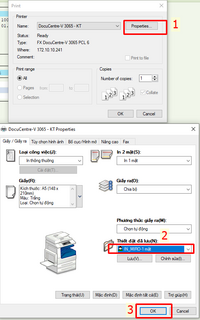
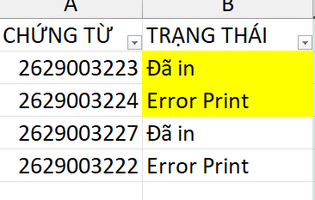
    Hiện em đang viết code VBA cho in tự động hàng loạt dựa theo chứng từ trên Excel và in theo T-Code SAP . Nhưng tới phần gọi cửa sổ print ( ngoài SAP) thì code lại không hiểu ạ. em thử dùng APPactive mà không gọi được cửa sổ này để chọn máy in và form in ( dòng 76 trở đi)

    Kính mong Anh chị em hỗ trợ xem qua giúp em ạ

    Em xin để số dt zalo: 0908.969.770 ạ
     

    File đính kèm

    SAP Scripting không với tới cửa sổ Windows được bạn, dùng thử SendKeys xem sao, bạn thử sub sau:


    Mã:
    #If VBA7 Then
        Private Declare PtrSafe Sub Sleep Lib "kernel32" (ByVal dwMilliseconds As Long)
    #Else
        Private Declare Sub Sleep Lib "kernel32" (ByVal dwMilliseconds As Long)
    #End If
    
    
    Private Function WaitAndActivate(ByVal titleHint As String, ByVal timeoutMs As Long) As Boolean
        Dim startT As Single
        startT = Timer
        Do While (Timer - startT) * 1000 < timeoutMs
            On Error Resume Next
            AppActivate titleHint
            If Err.Number = 0 Then
                On Error GoTo 0
                WaitAndActivate = True
                Exit Function
            End If
            Err.Clear
            On Error GoTo 0
            Sleep 200
        Loop
        WaitAndActivate = False
    End Function
    
    
    Sub AutoPrint_FB03_Final()
    
        Const PRINT_TITLE As String = "Print"
        Const USE_PROPERTIES As Boolean = False
    
        Dim SAP_app As Object, connection As Object, session As Object
        Dim ws As Worksheet
        Dim lastRow As Long, i As Long
        Dim docNumber As String
        Dim compCode As String, fiscalYear As String
        Dim WshShell As Object
    
        Set WshShell = CreateObject("WScript.Shell")
    
        On Error Resume Next
        Set SAP_app = GetObject("SAPGUI").GetScriptingEngine
        If SAP_app Is Nothing Then
            MsgBox "Không tìm thấy SAP. Vui lòng mở và đăng nhập SAP trước khi chạy lệnh!", vbCritical
            Exit Sub
        End If
        On Error GoTo 0
    
        Set connection = SAP_app.Children(0)
        Set session = connection.Children(0)
    
        Set ws = ThisWorkbook.Sheets("Sheet1")
        compCode = ws.Range("D2").Value
        fiscalYear = ws.Range("E2").Value
        lastRow = ws.Cells(ws.Rows.Count, "A").End(xlUp).Row
    
        session.findById("wnd[0]/tbar[0]/okcd").Text = "/nFB03"
        session.findById("wnd[0]").sendVKey 0
    
        For i = 2 To lastRow
    
            docNumber = Format(ws.Cells(i, 1).Value, "0000000000")
    
            If docNumber <> "0000000000" And ws.Cells(i, 2).Value <> "Đã in" Then
    
                On Error GoTo ErrorHandler
    
                session.findById("wnd[0]/usr/txtRF05L-BELNR").Text = docNumber
                session.findById("wnd[0]/usr/ctxtRF05L-BUKRS").Text = compCode
                session.findById("wnd[0]/usr/txtRF05L-GJAHR").Text = fiscalYear
                session.findById("wnd[0]").sendVKey 0
    
                session.findById("wnd[0]/mbar/menu[0]/menu[5]").Select
                session.findById("wnd[0]/mbar/menu[0]/menu[0]").Select
    
                session.findById("wnd[1]/usr/ctxtPRI_PARAMS-PDEST").Text = "LP01"
    
                session.findById("wnd[1]/usr/radRADIO0500_2").Select
    
                session.findById("wnd[2]/tbar[0]/btn[0]").press
    
                session.findById("wnd[1]/usr/txtPRIPAR_DYN-SPOOLPAGE1").Text = "2"
                session.findById("wnd[1]/usr/txtPRIPAR_DYN-SPOOLPAGE2").Text = "2"
    
                session.findById("wnd[1]/usr/subSUBSCREEN:SAPLSPRI:0600/cmbPRIPAR_DYN-PRIMM2").Key = "X"
    
                session.findById("wnd[1]/tbar[0]/btn[13]").SetFocus
                session.findById("wnd[1]/tbar[0]/btn[13]").press
    
                If Not WaitAndActivate(PRINT_TITLE, 10000) Then
                    Err.Raise 9999, , "Không tìm thấy cửa sổ Print sau 10 giây"
                End If
                Sleep 400
    
                If USE_PROPERTIES Then
                    WshShell.SendKeys "{TAB 1}", True
                    WshShell.SendKeys "{ENTER}", True
    
                    WaitAndActivate "Properties", 8000
                    Sleep 600
    
                    WshShell.SendKeys "{DOWN 5}", True
                    Sleep 800
                    WshShell.SendKeys "{ENTER}", True
                    Sleep 800
    
                    WaitAndActivate PRINT_TITLE, 8000
                    Sleep 400
                    WshShell.SendKeys "{ENTER}", True
                Else
                    WshShell.SendKeys "{ENTER}", True
                End If
    
                Sleep 1500
    
                session.findById("wnd[0]/tbar[0]/btn[3]").press
    
                ws.Cells(i, 2).Value = "Đã in"
    
    SkipToNext:
            End If
    
        Next i
    
        MsgBox "Print completed!", vbInformation
        Exit Sub
    
    ErrorHandler:
        ws.Cells(i, 2).Value = "Error Print"
        On Error Resume Next
        session.findById("wnd[0]/tbar[0]/btn[3]").press
        On Error GoTo 0
        Resume SkipToNext
    
    End Sub

     
    Upvote 0
    SAP Scripting không với tới cửa sổ Windows được bạn, dùng thử SendKeys xem sao, bạn thử sub sau:


    Mã:
    #If VBA7 Then
        Private Declare PtrSafe Sub Sleep Lib "kernel32" (ByVal dwMilliseconds As Long)
    #Else
        Private Declare Sub Sleep Lib "kernel32" (ByVal dwMilliseconds As Long)
    #End If
    
    
    Private Function WaitAndActivate(ByVal titleHint As String, ByVal timeoutMs As Long) As Boolean
        Dim startT As Single
        startT = Timer
        Do While (Timer - startT) * 1000 < timeoutMs
            On Error Resume Next
            AppActivate titleHint
            If Err.Number = 0 Then
                On Error GoTo 0
                WaitAndActivate = True
                Exit Function
            End If
            Err.Clear
            On Error GoTo 0
            Sleep 200
        Loop
        WaitAndActivate = False
    End Function
    
    
    Sub AutoPrint_FB03_Final()
    
        Const PRINT_TITLE As String = "Print"
        Const USE_PROPERTIES As Boolean = False
    
        Dim SAP_app As Object, connection As Object, session As Object
        Dim ws As Worksheet
        Dim lastRow As Long, i As Long
        Dim docNumber As String
        Dim compCode As String, fiscalYear As String
        Dim WshShell As Object
    
        Set WshShell = CreateObject("WScript.Shell")
    
        On Error Resume Next
        Set SAP_app = GetObject("SAPGUI").GetScriptingEngine
        If SAP_app Is Nothing Then
            MsgBox "Không tìm thấy SAP. Vui lòng mở và đăng nhập SAP trước khi chạy lệnh!", vbCritical
            Exit Sub
        End If
        On Error GoTo 0
    
        Set connection = SAP_app.Children(0)
        Set session = connection.Children(0)
    
        Set ws = ThisWorkbook.Sheets("Sheet1")
        compCode = ws.Range("D2").Value
        fiscalYear = ws.Range("E2").Value
        lastRow = ws.Cells(ws.Rows.Count, "A").End(xlUp).Row
    
        session.findById("wnd[0]/tbar[0]/okcd").Text = "/nFB03"
        session.findById("wnd[0]").sendVKey 0
    
        For i = 2 To lastRow
    
            docNumber = Format(ws.Cells(i, 1).Value, "0000000000")
    
            If docNumber <> "0000000000" And ws.Cells(i, 2).Value <> "Đã in" Then
    
                On Error GoTo ErrorHandler
    
                session.findById("wnd[0]/usr/txtRF05L-BELNR").Text = docNumber
                session.findById("wnd[0]/usr/ctxtRF05L-BUKRS").Text = compCode
                session.findById("wnd[0]/usr/txtRF05L-GJAHR").Text = fiscalYear
                session.findById("wnd[0]").sendVKey 0
    
                session.findById("wnd[0]/mbar/menu[0]/menu[5]").Select
                session.findById("wnd[0]/mbar/menu[0]/menu[0]").Select
    
                session.findById("wnd[1]/usr/ctxtPRI_PARAMS-PDEST").Text = "LP01"
    
                session.findById("wnd[1]/usr/radRADIO0500_2").Select
    
                session.findById("wnd[2]/tbar[0]/btn[0]").press
    
                session.findById("wnd[1]/usr/txtPRIPAR_DYN-SPOOLPAGE1").Text = "2"
                session.findById("wnd[1]/usr/txtPRIPAR_DYN-SPOOLPAGE2").Text = "2"
    
                session.findById("wnd[1]/usr/subSUBSCREEN:SAPLSPRI:0600/cmbPRIPAR_DYN-PRIMM2").Key = "X"
    
                session.findById("wnd[1]/tbar[0]/btn[13]").SetFocus
                session.findById("wnd[1]/tbar[0]/btn[13]").press
    
                If Not WaitAndActivate(PRINT_TITLE, 10000) Then
                    Err.Raise 9999, , "Không tìm thấy cửa sổ Print sau 10 giây"
                End If
                Sleep 400
    
                If USE_PROPERTIES Then
                    WshShell.SendKeys "{TAB 1}", True
                    WshShell.SendKeys "{ENTER}", True
    
                    WaitAndActivate "Properties", 8000
                    Sleep 600
    
                    WshShell.SendKeys "{DOWN 5}", True
                    Sleep 800
                    WshShell.SendKeys "{ENTER}", True
                    Sleep 800
    
                    WaitAndActivate PRINT_TITLE, 8000
                    Sleep 400
                    WshShell.SendKeys "{ENTER}", True
                Else
                    WshShell.SendKeys "{ENTER}", True
                End If
    
                Sleep 1500
    
                session.findById("wnd[0]/tbar[0]/btn[3]").press
    
                ws.Cells(i, 2).Value = "Đã in"
    
    SkipToNext:
            End If
    
        Next i
    
        MsgBox "Print completed!", vbInformation
        Exit Sub
    
    ErrorHandler:
        ws.Cells(i, 2).Value = "Error Print"
        On Error Resume Next
        session.findById("wnd[0]/tbar[0]/btn[3]").press
        On Error GoTo 0
        Resume SkipToNext
    
    End Sub

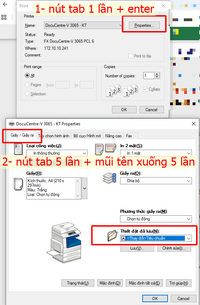
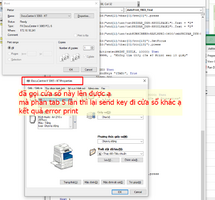
    Em dùng thử sendkey thì máy chạy in nhưng theo mẫu default của máy in ạ, code không chọn lại layout in đã thiết lập lưu được, mong bác xem qua giúp em ạ
     

    File đính kèm

    • 2.png
      2.png
      60.7 KB · Đọc: 7
    Upvote 0
    Dựa vào ảnh bạn gửi mình đã thêm TAB 5, bạn thử lại xem:


    Mã:
    #If VBA7 Then
        Private Declare PtrSafe Sub Sleep Lib "kernel32" (ByVal dwMilliseconds As Long)
    #Else
        Private Declare Sub Sleep Lib "kernel32" (ByVal dwMilliseconds As Long)
    #End If
    
    
    Private Function WaitAndActivate(ByVal titleHint As String, ByVal timeoutMs As Long) As Boolean
        Dim startT As Single
        startT = Timer
        Do While (Timer - startT) * 1000 < timeoutMs
            On Error Resume Next
            AppActivate titleHint
            If Err.Number = 0 Then
                On Error GoTo 0
                WaitAndActivate = True
                Exit Function
            End If
            Err.Clear
            On Error GoTo 0
            Sleep 200
        Loop
        WaitAndActivate = False
    End Function
    
    
    Sub AutoPrint_FB03_Final()
    
        Const PRINT_TITLE As String = "Print"
        Const USE_PROPERTIES As Boolean = True
    
        Dim SAP_app As Object, connection As Object, session As Object
        Dim ws As Worksheet
        Dim lastRow As Long, i As Long
        Dim docNumber As String
        Dim compCode As String, fiscalYear As String
        Dim WshShell As Object
    
        Set WshShell = CreateObject("WScript.Shell")
    
        On Error Resume Next
        Set SAP_app = GetObject("SAPGUI").GetScriptingEngine
        If SAP_app Is Nothing Then
            MsgBox "Không tìm thấy SAP. Vui lòng mở và đăng nhập SAP trước khi chạy lệnh!", vbCritical
            Exit Sub
        End If
        On Error GoTo 0
    
        Set connection = SAP_app.Children(0)
        Set session = connection.Children(0)
    
        Set ws = ThisWorkbook.Sheets("Sheet1")
        compCode = ws.Range("D2").Value
        fiscalYear = ws.Range("E2").Value
        lastRow = ws.Cells(ws.Rows.Count, "A").End(xlUp).Row
    
        session.findById("wnd[0]/tbar[0]/okcd").Text = "/nFB03"
        session.findById("wnd[0]").sendVKey 0
    
        For i = 2 To lastRow
    
            docNumber = Format(ws.Cells(i, 1).Value, "0000000000")
    
            If docNumber <> "0000000000" And ws.Cells(i, 2).Value <> "Đã in" Then
    
                On Error GoTo ErrorHandler
    
                session.findById("wnd[0]/usr/txtRF05L-BELNR").Text = docNumber
                session.findById("wnd[0]/usr/ctxtRF05L-BUKRS").Text = compCode
                session.findById("wnd[0]/usr/txtRF05L-GJAHR").Text = fiscalYear
                session.findById("wnd[0]").sendVKey 0
    
                session.findById("wnd[0]/mbar/menu[0]/menu[5]").Select
                session.findById("wnd[0]/mbar/menu[0]/menu[0]").Select
    
                session.findById("wnd[1]/usr/ctxtPRI_PARAMS-PDEST").Text = "LP01"
    
                session.findById("wnd[1]/usr/radRADIO0500_2").Select
    
                session.findById("wnd[2]/tbar[0]/btn[0]").press
    
                session.findById("wnd[1]/usr/txtPRIPAR_DYN-SPOOLPAGE1").Text = "2"
                session.findById("wnd[1]/usr/txtPRIPAR_DYN-SPOOLPAGE2").Text = "2"
    
                session.findById("wnd[1]/usr/subSUBSCREEN:SAPLSPRI:0600/cmbPRIPAR_DYN-PRIMM2").Key = "X"
    
                session.findById("wnd[1]/tbar[0]/btn[13]").SetFocus
                session.findById("wnd[1]/tbar[0]/btn[13]").press
    
                If Not WaitAndActivate(PRINT_TITLE, 10000) Then
                    Err.Raise 9999, , "Không tìm thấy cửa sổ Print sau 10 giây"
                End If
                Sleep 500
    
                If USE_PROPERTIES Then
                    WshShell.SendKeys "{TAB}", True
                    Sleep 300
                    WshShell.SendKeys "{ENTER}", True
    
                    If Not WaitAndActivate("Properties", 8000) Then
                        Err.Raise 9999, , "Không mở được cửa sổ Properties"
                    End If
                    Sleep 900
    
                    WshShell.SendKeys "{TAB 5}", True
                    Sleep 600
                    WshShell.SendKeys "{DOWN 5}", True
                    Sleep 900
    
                    WshShell.SendKeys "{ENTER}", True
                    Sleep 900
    
                    WaitAndActivate PRINT_TITLE, 8000
                    Sleep 500
                    WshShell.SendKeys "{ENTER}", True
                Else
                    WshShell.SendKeys "{ENTER}", True
                End If
    
                Sleep 1500
    
                session.findById("wnd[0]/tbar[0]/btn[3]").press
    
                ws.Cells(i, 2).Value = "Đã in"
    
    SkipToNext:
            End If
    
        Next i
    
        MsgBox "Print completed!", vbInformation
        Exit Sub
    
    ErrorHandler:
        ws.Cells(i, 2).Value = "Error Print"
        On Error Resume Next
        session.findById("wnd[0]/tbar[0]/btn[3]").press
        On Error GoTo 0
        Resume SkipToNext
    
    End Sub
     
    Lần chỉnh sửa cuối:
    Upvote 0

    Bài viết mới nhất

    Back
    Top Bottom